Monday, November 9, 2020

CARDIAC Simulation using PC/370 - Part 4

CARDIAC Simulation - Part 1 - Introduction to CARDIAC 

CARDIAC Simulation - Part 2 - Primary Logic/Architecture

CARDIAC Simulation - Part 3 - Memory Design / Management

CARDIAC Simulation - Part 4 - CARDIAC Instruction Set Processing

Here's the fourth & final installment of my CARDIAC Simulator project. The program TDCPU.ALC took about a day in total - design/development/testing. It took much longer to formulate this blog post - complete with the 3D stickman & computer hardware - than the actual PC/370 programming.


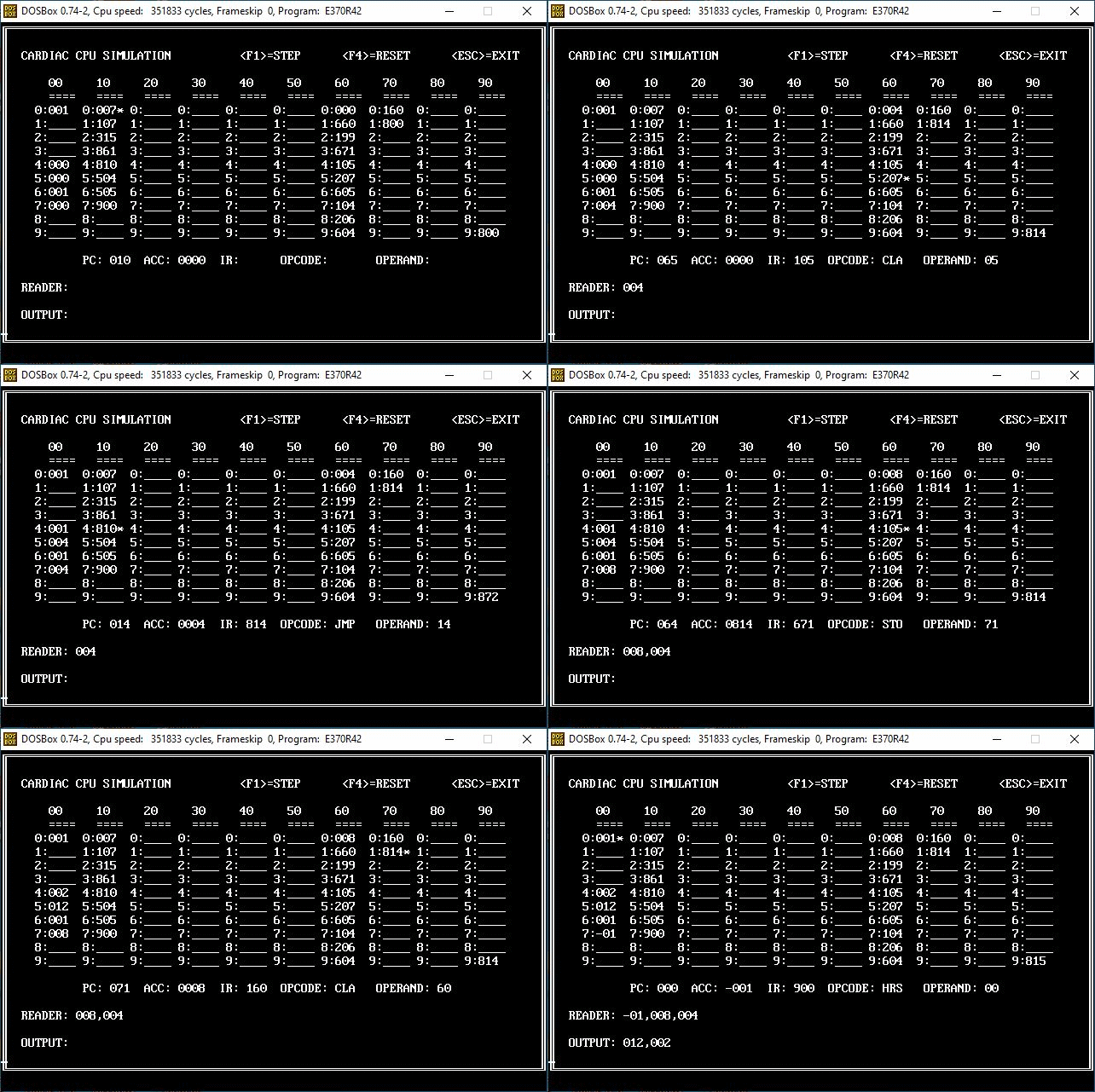
Above: CARDIAC Simulator Animation - Program Flow in Action.

The animation above demonstrates the program flow along with the cell & internal register updates (i.e. program counter/accumulator) along with display fields for the instruction, reader & output. The asterisk (*) tracks the program counter which, for the purposes of my simulator, I have always defaulted to cell 10. This leaves the first column (under 00) for program variables.

CARDIAC Instruction Set

Opcode  Mnemonic  Operation
======  ========  ===================================================
0       INP       Read a card into memory
1       CLA       Clear accumulator and add from memory (load)
2       ADD       Add from memory to accumulator
3       TAC       Test accumulator and jump if negative
4       SFT       Shift accumulator
5       OUT       Write memory location to output card
6       STO       Store accumulator to memory
7       SUB       Subtract memory from accumulator
8       JMP       Jump and save PC
9       HRS       Halt and reset
======  ========  ===================================================

CARDIAC Operation Table

The <F1> STEP key searches for the proper operational routine for the current Opcode & branches to it. Upon return it loops back, displays the screen & accepts the next keyboard input.

*---------------------------------------------------------------------*
*        CARDIAC OPERATIONS/ROUTINES                                  *
*---------------------------------------------------------------------*
OPTAB    DS    0F                            OPERATION TABLE
         DC    C'0',C'INP',A(@INP)           0-INP-READ INPUT
         DC    C'1',C'CLA',A(@CLA)           1-CLA-CLEAR ACC FROM MEM
         DC    C'2',C'ADD',A(@ADD)           2-ADD-TO ACC FROM MEM
         DC    C'3',C'TAC',A(@TAC)           3-TAC-TEST ACC/JMP NEG
         DC    C'4',C'SFT',A(@SFT)           4-SFT-SHIFT ACC L/R
         DC    C'5',C'OUT',A(@OUT)           5-OUT-WRITE MEM TO OUT
         DC    C'6',C'STO',A(@STO)           6-STO-STORE ACC TO MEM
         DC    C'7',C'SUB',A(@SUB)           7-SUB-MEM FROM ACC
         DC    C'8',C'JMP',A(@JMP)           8-JMP-JUMP/SAVE PC99
         DC    C'9',C'HRS',A(@HRS)           9-HRS-HALT/RESET
         DC    X'FF'                         END OF TABLE
*---------------------------------------------------------------------*

Now for the individual instruction routines. Each component performs a very simple function - mostly reading or writing the cell values or updating the program counter & accumulator.

0: INP - Read Card into Memory Location

The INP instruction reads the next value contained in the input card deck. In this case the deck is the DTAB table that contains our data values. As a data record is read the value is placed in the cell specified by the operand. The DTAB pointer (DPTR) is also incremented (for the next read) & the value is presented on the screen in the SCRRDR variable.

***********************************************************************
*        0:INP - READ CARD INTO MEMORY LOCATION                       *
***********************************************************************
         DC    F'0'                          RETURN ADDRESS SAVE AREA
@INP     EQU   *
         ST    6,*-4                         SAVE RETURN ADDRESS
*
         L     8,DPTR                        LOAD DECK POINTER
         CLI   0(8),X'FF'                    END OF TABLE??
         BE    @INPX                         YES - EXIT ROUTING
*
         LA    5,62                          LOAD SCRRDR COUNT
         LA    6,SCRRDR+61                   LOAD SCRRDR OFFSET
@INPRDR  EQU   *
         MVC   4(1,6),0(6)                   BUMP READER ENTRIES
         SH    6,=H'1'                       DECREMENT SCRRDR PTR
         BCT   5,@INPRDR                     LOOP UNTIL COMPLETE
*
         MVC   SCRRDR(3),0(8)                MOVE DECK ENTRY
         C     8,=A(DTAB)                    FIRST DECK ENTRY?
         BE    *+8                           YES - BYPASS COMMA
         MVI   SCRRDR+3,C','                 MOVE COMMA DELIMITER
*
         LA    7,MEMTAB                      LOAD MEMORY ADDRESS
         PACK  DUBB,XOPER                    MOVE TARGET OPERAND
         CVB   3,DUBB                        CONVERT TO BINARY
         MH    3,=H'8'                       MULTIPLY BY LENGTH
         AR    7,3                           ADJUST MEMORY PTR
         MVC   0(3,7),0(8)                   MOVE DECK ENTRY TO CELL
*
         LA    8,6(,8)                       BUMP DECK POINTER
         ST    8,DPTR                        STORE DECK POINTER
@INPX    EQU   *
         L     6,@INP-4                      RESTORE LINK REGISTER
         BR    6                             BRANCH ON LINK REGISTER
***********************************************************************

1: CLA - Clear Accumulator & Add From Memory

The CLA instruction clears the accumulator & effectively replaces it with the value contained in the cell specified by the operand. Since there is only one accumulator it's value may need to be stored, cleared & reloaded on multiple occasions. That is the nature of this simple CPU.

***********************************************************************
*        1:CLA - CLEAR ACCUMULATOR & ADD FROM MEMORY                  *
***********************************************************************
         DC    F'0'                          RETURN ADDRESS SAVE AREA
@CLA     EQU   *
         ST    6,*-4                         SAVE RETURN ADDRESS
*
         LA    7,MEMTAB                      LOAD MEMORY ADDRESS
         PACK  DUBB,XOPER                    MOVE TARGET OPERAND
         CVB   3,DUBB                        CONVERT TO BINARY
         MH    3,=H'8'                       MULTIPLY BY LENGTH
         AR    7,3                           ADJUST MEMORY PTR
*
         ZAP   XACC,=P'0'                    CLEAR ACCUM PACKED
         MVC   XACCU(4),=CL4'0000'           CLEAR ACCUM CHAR
         CLI   0(7),C'-'                     NEGATIVE SIGN?
         BE    @CLANEG                       YES - HANDLE NEGATIVE        
@CLAPOS  EQU   *
         MVC   XACCU+1(3),0(7)               MOVE CELL DATA
         PACK  XACC,XACCU                    PACK ACCUMULATOR
         B     @CLAX                         EXIT ROUTINE PLEASE
@CLANEG  EQU   *
         MVC   XACCU+2(2),1(7)               MOVE CELL DATA
         PACK  XACC,XACCU                    PACK ACCUMULATOR
         NI    XACC+2,X'F0'                  TURN OFF SIGN BITS
         OI    XACC+2,X'0D'                  SET NEGATIVE SIGN
         MVI   XACCU,C'-'                    SET NEGATIVE CHAR
@CLAX    EQU   *
         L     6,@CLA-4                      RESTORE LINK REGISTER
         BR    6                             BRANCH ON LINK REGISTER
***********************************************************************

2: ADD - Add From Memory to Accumulator

The ADD instruction adds the value contained in the cell specified by the operand to the accumulator.

***********************************************************************
*        2:ADD - ADD FROM MEMORY TO ACCUMULATOR                       *
***********************************************************************
         DC    F'0'                          RETURN ADDRESS SAVE AREA
@ADD     EQU   *
         ST    6,*-4                         SAVE RETURN ADDRESS
*
         LA    7,MEMTAB                      LOAD MEMORY ADDRESS
         PACK  DUBB,XOPER                    MOVE TARGET OPERAND
         CVB   3,DUBB                        CONVERT TO BINARY
         MH    3,=H'8'                       MULTIPLY BY LENGTH
         AR    7,3                           ADJUST MEMORY PTR
*
         CLI   0(7),C'-'                     NEGATIVE SIGN?
         BE    @ADDNEG                       YES - HANDLE NEGATIVE        
@ADDPOS  EQU   *
         PACK  WORK,0(3,7)                   PACK CELL VALUE
         B     @ADDACC                       ADD TO ACCUMULATOR
@ADDNEG  EQU   *
         PACK  WORK,1(2,7)                   PACK CELL VALUE
         NI    WORK+1,X'F0'                  TURN OFF SIGN BITS
         OI    WORK+1,X'0D'                  SET NEGATIVE SIGN
@ADDACC  EQU   *
         AP    XACC,WORK                     ADD TO ACCUMULATOR
*
         UNPK  XACCU,XACC                    UNPACK ACCUMULATOR
         OI    XACCU+3,X'F0'                 TURN ON ZONE BITS
         CP    XACC,=P'0'                    ACCUMULATOR NEGATIVE?
         BNL   @ADDX                         NO  - EXIT ROUTINE
         MVI   XACCU,C'-'                    SET NEGATIVE CHAR
@ADDX    EQU   *
         L     6,@ADD-4                      RESTORE LINK REGISTER
         BR    6                             BRANCH ON LINK REGISTER
***********************************************************************

3: TAC - Test Accumulator - Jump If Negative

The TAC instruction performs a jump if the accumulator is negative. The program counter is set to the value of the instruction operand. Unlike the JMP instruction a return address is not formatted & placed in cell 99. This is helpful when reading input & ending with a -1 value.

***********************************************************************
*        3:TAC - TEST ACCUMULATOR - JUMP IF NEGATIVE                  *
***********************************************************************
         DC    F'0'                          RETURN ADDRESS SAVE AREA
@TAC     EQU   *
         ST    6,*-4                         SAVE RETURN ADDRESS
*
         CP    XACC,=P'0'                    ACCUMULATOR NEGATIVE?
         BNL   @TACX                         NO  - EXIT ROUTINE
*
         ZAP   ZPC,XPC                       SAVE PRIOR INSTRUCTION
         PACK  XPC,XOPER                     SET JUMP ADDRESS
         UNPK  XPCU,XPC                      UNPACK PROGRAM COUNTER
         OI    XPCU+2,X'F0'                  TURN ON ZONE BITS
@TACX    EQU   *
         L     6,@TAC-4                      RESTORE LINK REGISTER
         BR    6                             BRANCH ON LINK REGISTER
***********************************************************************

4: SFT - Shift Accumulator (Left/Right)

The SFT instruction is seldom used with very little, if any, examples in the CARDIAC documentation. The 2-digit operand is split in two and represents both a shift to the left & a shift to the right. Since we are working with 3-digit integers any shift value > 3 (in either direction) simply sets the field to zero. It's difficult to have a sensible shift with so few integers but here it is anyway. Bytes are moved in a simplistic fashion within a loop for each shift value. No need to over engineer on this one.

***********************************************************************
*        4:SFT - SHIFT ACCUMULATOR (LEFT/RIGHT)                       *
***********************************************************************
         DC    F'0'                          RETURN ADDRESS SAVE AREA
@SFT     EQU   *
         ST    6,*-4                         SAVE RETURN ADDRESS
*
         MVI   WSIGN,C' '                    INIT NEGATIVE SIGN
         CP    XACC,=P'0'                    ACCUMULATOR NEGATIVE?
         BNL   *+8                           NO  - CONTINUE PLEASE
         MVI   WSIGN,C'-'                    YES - SET NEGATIVE SIGN
*   
         PACK  DUBB,XOPER(1)                 LOAD LEFT SHIFT VALUE
         CP    DUBB,=P'0'                    LEFT SHIFT = ZERO?
         BE    @SFTR                         YES - BYPASS LEFT SHIFT
         CP    DUBB,=P'4'                    SHIFT LESS THAN 4??
         BL    *+20                          YES - PERFORM LEFT SHIFT
         MVC   XACCU,=CL4'0000'              CLEAR ACCUMULATOR CHAR
         ZAP   XACC,=P'0'                    CLEAR ACCUMULATOR PACK
         B     @SFTX                         EXIT ROUTINE PLEASE
*
         CLI   XACCU,C'-'                    NEGATIVE SIGN?
         BNE   *+8                           NO  - CONTINUE PLEASE
         MVI   XACCU,C'0'                    YES - SET TO ZERO
*
         CVB   4,DUBB                        CONVERT SHIFT TO BINARY
@SFTLM   EQU   *
         MVC   XACCU(1),XACCU+1              SHIFT LEFT PART 1
         MVC   XACCU+1(1),XACCU+2            SHIFT LEFT PART 2
         MVC   XACCU+2(1),XACCU+3            SHIFT LEFT PART 3
         MVI   XACCU+3,C'0'                  SHIFT LEFT PART 4
         BCT   4,@SFTLM                      LOOP UNTIL COMPLETE
@SFTR    EQU   *
         PACK  DUBB,XOPER+1(1)               LOAD RIGHT SHIFT VALUE
         CP    DUBB,=P'0'                    RIGHT SHIFT = ZERO?
         BE    @SFTACC                       YES - BYPASS RIGHT SHIFT
         CP    DUBB,=P'4'                    SHIFT LESS THAN 4??
         BL    *+20                          YES - PERFORM RIGHT SHIFT
         MVC   XACCU,=CL4'0000'              CLEAR ACCUMULATOR CHAR
         ZAP   XACC,=P'0'                    CLEAR ACCUMULATOR PACK
         B     @SFTX                         EXIT ROUTINE PLEASE
*
         CLI   XACCU,C'-'                    NEGATIVE SIGN?
         BNE   *+8                           NO  - CONTINUE PLEASE
         MVI   XACCU,C'0'                    YES - SET TO ZERO
*
         CVB   4,DUBB                        CONVERT SHIFT TO BINARY
@SFTRM   EQU   *
         MVC   XACCU+3(1),XACCU+2            SHIFT RIGHT PART 1
         MVC   XACCU+2(1),XACCU+1            SHIFT RIGHT PART 2
         MVC   XACCU+1(1),XACCU              SHIFT RIGHT PART 3
         MVI   XACCU,C'0'                    SHIFT RIGHT PART 4
         BCT   4,@SFTRM                      LOOP UNTIL COMPLETE
@SFTACC  EQU   *
         PACK  XACC,XACCU                    PACK ACCUMULATOR
         CLI   WSIGN,C'-'                    ACCUMULATOR NEGATIVE?
         BNE   @SFTX                         NO  - EXIT ROUTINE PLEASE
*        
*        PRESERVE NEGATIVE SIGN (DUE TO SPACE LIMITATIONS)
*
         MVI   XACCU,C'0'                    SET HIGH ORDER TO ZERO
         PACK  XACC,XACCU                    PACK ACCUMULATOR
         NI    XACC+2,X'F0'                  TURN OFF SIGN BITS
         OI    XACC+2,X'0D'                  SET NEGATIVE SIGN
         MVI   XACCU,C'-'                    SET NEGATIVE CHAR
@SFTX    EQU   *
         L     6,@SFT-4                      RESTORE LINK REGISTER
         BR    6                             BRANCH ON LINK REGISTER
***********************************************************************

5: OUT - Write Memory Location to Output

The OUT instruction writes the cell value specified by the operand to the "theoretical" printing device. In this case I have a screen variable called SCROUT that displays the output. The output values push to the right as they are written.

***********************************************************************
*        5:OUT - WRITE MEMORY LOCATION TO OUTPUT                      *
***********************************************************************
         DC    F'0'                          RETURN ADDRESS SAVE AREA
@OUT     EQU   *
         ST    6,*-4                         SAVE RETURN ADDRESS
*
         LA    5,62                          LOAD SCROUT COUNT
         LA    6,SCROUT+61                   LOAD SCROUT OFFSET
@OUTBMP  EQU   *
         MVC   4(1,6),0(6)                   BUMP READER ENTRIES
         SH    6,=H'1'                       DECREMENT SCRRDR PTR
         BCT   5,@OUTBMP                     LOOP UNTIL COMPLETE
*
         LA    7,MEMTAB                      LOAD MEMORY ADDRESS
         PACK  DUBB,XOPER                    MOVE TARGET OPERAND
         CVB   3,DUBB                        CONVERT TO BINARY
         MH    3,=H'8'                       MULTIPLY BY LENGTH
         AR    7,3                           ADJUST MEMORY PTR
         MVC   SCROUT(3),0(7)                PRINT CELL DATA
*
         CLI   SCROUT+4,C' '                 FIRST DECK ENTRY?
         BE    *+8                           YES - BYPASS COMMA
         MVI   SCROUT+3,C','                 MOVE COMMA DELIMITER
@OUTX    EQU   *
         L     6,@OUT-4                      RESTORE LINK REGISTER
         BR    6                             BRANCH ON LINK REGISTER
***********************************************************************

6: STO - Store Accumulator to Memory Location

The STO instruction places the current value of the accumulator in the cell specified by the operand.

***********************************************************************
*        6:STO - STORE ACCUMULATOR TO MEMORY LOCATION                 *
***********************************************************************
         DC    F'0'                          RETURN ADDRESS SAVE AREA
@STO     EQU   *
         ST    6,*-4                         SAVE RETURN ADDRESS
*
         LA    7,MEMTAB                      LOAD MEMORY ADDRESS
         PACK  DUBB,XOPER                    MOVE TARGET OPERAND
         CVB   3,DUBB                        CONVERT TO BINARY
         MH    3,=H'8'                       MULTIPLY BY LENGTH
         AR    7,3                           ADJUST MEMORY PTR
         MVC   0(3,7),XACCU+1                MOVE ACCUMULATOR TO CELL
         CLI   XACCU,C'-'                    ACCUMULATOR NEGATIVE?
         BNE   @STOX                         NO  - EXIT ROUTINE
         MVI   0(7),C'-'                     YES - SET NEGATIVE SIGN
@STOX    EQU   *
         L     6,@STO-4                      RESTORE LINK REGISTER
         BR    6                             BRANCH ON LINK REGISTER
***********************************************************************

7: SUB - Subtract Memory From Accumulator

The SUB instruction subtracts the value contained in the cell specified by the operand from the accumulator.

***********************************************************************
*        7:SUB - SUBTRACT MEMORY FROM ACCUMULATOR                     *
***********************************************************************
         DC    F'0'                          RETURN ADDRESS SAVE AREA
@SUB     EQU   *
         ST    6,*-4                         SAVE RETURN ADDRESS
*
         LA    7,MEMTAB                      LOAD MEMORY ADDRESS
         PACK  DUBB,XOPER                    MOVE TARGET OPERAND
         CVB   3,DUBB                        CONVERT TO BINARY
         MH    3,=H'8'                       MULTIPLY BY LENGTH
         AR    7,3                           ADJUST MEMORY PTR
*
         CLI   0(7),C'-'                     NEGATIVE SIGN?
         BE    @SUBNEG                       YES - HANDLE NEGATIVE        
@SUBPOS  EQU   *
         PACK  WORK,0(3,7)                   PACK CELL VALUE
         B     @SUBACC                       SUB FROM ACCUMULATOR
@SUBNEG  EQU   *
         PACK  WORK,1(2,7)                   PACK CELL VALUE
         NI    WORK+1,X'F0'                  TURN OFF SIGN BITS
         OI    WORK+1,X'0D'                  SET NEGATIVE SIGN
@SUBACC  EQU   *
         SP    XACC,WORK                     SUB FROM ACCUMULATOR
*
         UNPK  XACCU,XACC                    UNPACK ACCUMULATOR
         OI    XACCU+3,X'F0'                 TURN ON ZONE BITS
         CP    XACC,=P'0'                    ACCUMULATOR NEGATIVE?
         BNL   @SUBX                         NO  - EXIT ROUTINE
         MVI   XACCU,C'-'                    SET NEGATIVE CHAR
@SUBX    EQU   *
         L     6,@SUB-4                      RESTORE LINK REGISTER
         BR    6                             BRANCH ON LINK REGISTER
***********************************************************************

8: JMP - Jump & Save Program Counter

The JMP instruction performs two functions. First it takes the address of the next sequential instruction & stores it as a JMP instruction in cell 99. This means it has the prefix of "8" followed by the 2-digit cell address. This is how subroutines can be constructed. Secondly, the instruction then transfers control to the address specified by the operand - this is accomplished simply by updating the program counter.

***********************************************************************
*        8:JMP - JUMP & SAVE PROGRAM COUNTER                          *
***********************************************************************
         DC    F'0'                          RETURN ADDRESS SAVE AREA
@JMP     EQU   *
         ST    6,*-4                         SAVE RETURN ADDRESS
*
         L     7,MEM99                       LOAD CELL 99 ADDRESS
         MVI   0(7),C'8'                     STORE JUMP OPCODE
         MVC   1(2,7),XPCU+1                 STORE PROGRAM COUNTER
*
         ZAP   ZPC,XPC                       SAVE PRIOR INSTRUCTION
         PACK  XPC,XOPER                     SET JUMP ADDRESS
         UNPK  XPCU,XPC                      UNPACK PROGRAM COUNTER
         OI    XPCU+2,X'F0'                  TURN ON ZONE BITS
@JMPX    EQU   *
         L     6,@JMP-4                      RESTORE LINK REGISTER
         BR    6                             BRANCH ON LINK REGISTER
***********************************************************************

9: HRS - Halt & Reset

This stops the program & sets the program counter to the operand values of the instruction. The typical HRS code is "900" which sets the program counter to 00. In my version of the simulator I deactivate the <F1> STEP key after the halt if the 00 operand is used. At that point the user can only use <ESC> EXIT or <F4> RESET to start over.

***********************************************************************
*        9:HRS - HALT & RESET                                         *
***********************************************************************
         DC    F'0'                          RETURN ADDRESS SAVE AREA
@HRS     EQU   *
         ST    6,*-4                         SAVE RETURN ADDRESS
*
         ZAP   ZPC,XPC                       SAVE PRIOR INSTRUCTION
         PACK  XPC,XOPER                     SET JUMP ADDRESS
         UNPK  XPCU,XPC                      UNPACK PROGRAM COUNTER
         OI    XPCU+2,X'F0'                  TURN ON ZONE BITS
@HRSX    EQU   *
         L     6,@HRS-4                      RESTORE LINK REGISTER
         BR    6                             BRANCH ON LINK REGISTER
***********************************************************************

The CARDIAC Simulator and this blog topic are now complete!


That's all there is to say about that...


CARDIAC Simulation using PC/370 - Part 3

CARDIAC Simulation - Part 1 - Introduction to CARDIAC 

CARDIAC Simulation - Part 2 - Primary Logic/Architecture

CARDIAC Simulation - Part 3 - Memory Design / Management

CARDIAC Simulation - Part 4 - CARDIAC Instruction Set Processing

Welcome back! Here's the 3rd part of my CARDIAC Simulation project (See Part 1 for an Overview). As mentioned in the previous posts CARDIAC is a mini-CPU created by David Hagelbarger at Bell Labs in the 1960's. It's a theoretical piece of hardware made out of cardboard with strategically placed sliders. My daughter's college class based some assignments on it. When she showed it to me I decided to create my own working CARDIAC simulator. The question shouldn't be "Why?" - it should be "Why not?"

CARDIAC Simulator - Memory Design / Management

Above: Constructing my version of the CARDIAC Simulator. The little stick guy is trying to help...

The critical component in creating this simulator is memory design & management. Once this architecture is in place the execution of the individual instructions becomes very easy.

Memory Table - 100 Cells

The MEMTAB contains 100 entries for CARDIAC cells 00 thru 99. The first 4 positions will hold the object code & data values. Due to 24x80 screen restrictions I decided to limit the memory screen display to 3 characters. The second 2-byte position contains the numeric value of the cell (00 thru 99). The third 2-byte packed field holds the calculated displacement for the screen display. The ten's position is multiplied by 7 and the one's position is multiplied by 70. It is calculated once & used throughout the program.

*---------------------------------------------------------------------*
*        CARDIAC MEMORY/CELL LOCATIONS                                *
*---------------------------------------------------------------------*
MEMTAB   DC    100XL8'00000000F0F0000F'      MEMORY CELLS 00-99
         DC    X'FF'                         END OF TABLE
MEM99    DC    A(MEMTAB+99*8)                CELL 99 ADDRESS FOR JMP
***********************************************************************
 

Memory Initialization

Memory is initialized at the start of the program and when the <F4> RESET key is pressed. The CODE contained in the input file has already been read & stored in the table CTAB. It is distributed into the proper cells in MEMTAB in the Initialization/Reset process.

***********************************************************************
*        INITIALIZE MEMORY AREA                                       *
***********************************************************************
         DC    F'0'                          RETURN ADDRESS SAVE AREA
INIT     EQU   *
         ST    6,*-4                         SAVE RETURN ADDRESS
*
         LA    2,BLANK                       LOAD SOURCE ADDRESS
         LA    3,1                           LOAD SOURCE LENGTH
         LA    4,MEMTAB                      LOAD TARGET ADDRESS
         LA    5,100*8                       LOAD TARGET LENGTH
         ICM   3,B'1000',BLANK               LOAD PAD CHARACTER
         MVCL  4,2                           INIT RECORD AREA
*
         LA    7,MEMTAB                      LOAD MEMORY ADDRESS
         ZAP   CTR,=P'0'                     INIT CELL COUNTER
ILOOP0   EQU   *
         CLI   0(7),X'FF'                    END OF TABLE???
         BE    ILOOP0X                       YES - EXIT LOOP
*
         OI    CTR+1,X'0F'                   TURN ON SIGN BITS
         UNPK  4(2,7),CTR                    UNPACK COUNTER
*
         PACK  WTENS,4(1,7)                  PACK TEN'S PLACE
         PACK  WONES,5(1,7)                  PACK ONE'S PLACE
         MP    WTENS,=PL2'7'                 ADJUST COL BY 7
         MP    WONES,=PL2'70'                ADJUST ROW BY 70
         ZAP   WDISP,=P'0'                   INIT DISPLACEMENT
         AP    WDISP,WONES                   ADD ROW ADJUSTMENT
         AP    WDISP,WTENS                   ADD COL ADJUSTMENT
         MVC   6(2,7),WDISP+2                SAVE DISPLACEMENT
INITBC   BC    0,INITGO
         MVC   OPRT,OBLANK                   CLEAR OUTPUT RECORD
         MVC   OPRT(7),=CL7'*MEMX*'          MOVE TRACE ID
         MVC   OPRT+7(2),4(7)                MOVE CELL NUMBER
         MVC   OPRT+11(4),0(7)               MOVE CELL CONTENTS
         UNPK  OPRT+17(3),6(2,7)             MOVE DISPLACEMENT  
         OI    OPRT+19,X'F0'                 TURN ON ZONE BITS
         XPRNT OREC,132                      WRITE OUTPUT RECORD
INITGO   EQU   *
         LA    7,8(,7)                       BUMP MEM POINTER
         AP    CTR,=P'1'                     ADD TO CELL COUNT
         B     ILOOP0                        LOOP AGAIN PLEASE    
ILOOP0X  EQU   *
         LA    8,CTAB                        LOAD CODE ADDRESS
ILOOP1   EQU   *
         CLI   0(8),X'FF'                    END OF CODE???
         BE    ILOOP1X                       YES - EXIT LOOP
*
         LA    7,MEMTAB                      LOAD MEMORY ADDRESS
         PACK  DUBB,0(2,8)                   PACK CELL NUMBER
         CVB   3,DUBB                        CONVERT TO BINARY
         MH    3,=H'8'                       MULTIPLY BY LENGTH
         AR    7,3                           ADJUST MEMORY PTR
         MVC   0(4,7),=CL4' '                CLEAR CELL CONTENTS
         MVC   0(3,7),2(8)                   MOVE CODE TO MEMORY
*
         LA    8,5(,8)                       BUMP CODE POINTER
         B     ILOOP1                        TEST NEXT ENTRY
ILOOP1X  EQU   *
         ZAP   XACC,=P'0'                    ACCUMULATOR PACKED
         MVC   XACCU,=CL4'0000'              ACCUMULATOR UNPACKED
         ZAP   ZPC,=P'-1'                    PROGRAM COUNTER PREVIOUS
         ZAP   XPC,=P'10'                    PROGRAM COUNTER PACKED
         MVC   XPCU,=CL3'010'                PROGRAM COUNTER UNPACKED
         MVC   XIR,=CL3' '                   INSTRUCTION REGISTER
         MVC   XMNE,=CL3' '                  OPERATION MNEMONIC
*
         MVC   DPTR,=A(DTAB)                 RESET DECK POINTER
         MVI   SCRRDR,C' '                   MOVE BLANK TO SCRRDR
         MVC   SCRRDR+1(L'SCRRDR-1),SCRRDR   PROPAGATE BLANKS
         MVI   SCROUT,C' '                   MOVE BLANK TO SCROUT
         MVC   SCROUT+1(L'SCROUT-1),SCROUT   PROPAGATE BLANKS
*
         OI    INITBC+1,X'F0'                DEACTIVATE TRACE OUTPUT
INITX    EQU   *
         L     6,INIT-4                      RESTORE LINK REGISTER
         BR    6                             BRANCH ON LINK REGISTER
***********************************************************************
 

Displaying Memory on the Screen

As the program progresses via the <F1> STEP key the memory values may change along with the Program Counter that tracks the executable lines. An asterisk (*) is displayed on the screen to track the current instruction. The MEMTAB values are copied to the screen location using the pre-calculated displacements. The standard SCREEN build routine is then called at the top of the main processing loop.

***********************************************************************
*        MEMORY TO SCREEN                                             *
***********************************************************************
         DC    F'0'                          RETURN ADDRESS SAVE AREA
MEMSCR   EQU   *
         ST    6,*-4                         SAVE RETURN ADDRESS
*
         LA    6,100                         LOAD CELL COUNT
         LA    7,MEMTAB                      LOAD MEMORY ADDRESS
MEMLOOP  EQU   *
         LA    5,SCRMEM0+2                   LOAD SCREEN ADDRESS
         ZAP   DUBB,6(2,7)                   LOAD DISPLACEMENT
         CVB   4,DUBB                        CONVERT TO BINARY
         AR    5,4                           ADD DISPLACEMENT
*
         CLI   0(7),C' '                     MEMORY CELL BLANK???
         BNE   MEMBC                         NO  - CONTINUE PLEASE
         MVC   0(4,5),=CL4'____'             CLEAR MEMORY AREA
         B     MEMBUMP                       BUMP CELL POINTER
MEMBC    BC    0,MEMFILL
         MVC   OPRT,OBLANK                   CLEAR OUTPUT RECORD
         MVC   OPRT(7),=CL7'*MEM#*'          MOVE TRACE ID
         MVC   OPRT+7(2),4(7)                MOVE CELL NUMBER
         MVC   OPRT+11(4),0(7)               MOVE CELL CONTENTS
         UNPK  OPRT+17(3),6(2,7)             MOVE DISPLACEMENT
         OI    OPRT+19,X'F0'                 TURN ON ZONE BITS
         XPRNT OREC,132                      WRITE OUTPUT RECORD
MEMFILL  EQU   *
         MVC   0(4,5),=CL4' '                CLEAR MEMORY AREA
         MVC   0(3,5),0(7)                   MOVE CODE TO MEMORY
         CLC   XPCU+1(2),4(7)                PROGRAM COUNTER??
         BNE   MEMBUMP                       NO  - CONTINUE PLEASE
         MVI   3(5),C'*'                     YES - FLAG CELL
MEMBUMP  EQU   *
         LA    7,8(,7)                       BUMP MEMORY ADDRESS
         BCT   6,MEMLOOP                     LOOP UNTIL COMPLETE
*
         MVC   SCRVAR+4(3),XPCU              MOVE PROGRAM COUNTER
         MVC   SCRVAR+14(4),XACCU            MOVE ACCUMULATOR
         MVC   SCRVAR+24(3),XIR              MOVE INSTRUCT REGISTER
         MVC   SCRVAR+37(3),XMNE             MOVE INSTRUCT MNEMONIC
         MVC   SCRVAR+52(2),XOPER            MOVE INSTRUCT OPERANDS
*
         OI    MEMBC+1,X'F0'                 DEACTIVATE TRACE OUTPUT
MEMSCRX  EQU   *
         L     6,MEMSCR-4                    RESTORE LINK REGISTER
         BR    6                             BRANCH ON LINK REGISTER
***********************************************************************
 

CODE/DATA Loaded from Input File TDCPU.TXT

All Code & Data is contained in the file TDCPU.TXT (as opposed to entering it cell by cell like the college's online simulator). The Code & Deck entries are held in the tables CTAB & DTAB respectively. CTAB is utilized by the Memory Initialization routine while DTAB is the data source behind the INP (Read Input) CARDIAC Instruction.

***********************************************************************
*        DATA LOAD - CARDIAC CODE & DECK                              *
***********************************************************************
         DC    F'0'                          RETURN ADDRESS SAVE AREA
DATA     EQU   *
         ST    6,*-4                         SAVE RETURN ADDRESS
*
         XFILI STDWKI                        OPEN INPUT  FILE
*
         LA    8,CTAB                        LOAD CODE ADDRESS
         LA    9,DTAB                        LOAD DECK ADDRESS
GETI     EQU   *
         XREAD IREC,80                       READ INPUT RECORD
         BNZ   EOFI                          EOF - EXIT ROUTINE
*
         CLC   IREC(5),=C'CODE:'             DATA = CODE???
         BNE   *+12                          NO  - CHECK DECK
         BAL   6,ICODE                       YES - PROCESS CODE
         B     GETI                          READ NEXT RECORD
*
         CLC   IREC(5),=C'DECK:'             DATA = DECK???
         BNE   GETI                          NO  - READ AGAIN
         BAL   6,IDECK                       YES - PROCESS DECK
         B     GETI                          READ NEXT RECORD
EOFI     EQU   *
         MVI   0(8),X'FF'                    END OF CODE TABLE
         MVI   0(9),X'FF'                    END OF DECK TABLE
DATAX    EQU   *
         L     6,DATA-4                      RESTORE LINK REGISTER
         BR    6                             BRANCH ON LINK REGISTER
***********************************************************************
         EJECT
***********************************************************************
*        INPUT CODE - CARDIAC OBJECT CODE    R8=CTAB (CL2+CL3)        *
***********************************************************************
         DC    F'0'                          RETURN ADDRESS SAVE AREA
ICODE    EQU   *
         ST    6,*-4                         SAVE RETURN ADDRESS
*
         MVC   0(2,8),IREC+5                 MOVE CELL NUMBER
         MVC   2(3,8),IREC+8                 MOVE INSTRUCTION
*
         MVC   OPRT,OBLANK                   CLEAR OUTPUT RECORD
         MVC   OPRT(7),=CL7'*CODE*'          MOVE TRACE ID
         MVC   OPRT+7(2),0(8)                MOVE CELL NUMBER
         MVC   OPRT+10(3),2(8)               MOVE INSTRUCTION
         MVC   OPRT+20(40),IREC              MOVE INPUT RECORD
         XPRNT OREC,132                      WRITE OUTPUT RECORD
*
         LA    8,5(,8)                       BUMP TABLE POINTER
ICODEX   EQU   *
         L     6,ICODE-4                     RESTORE LINK REGISTER
         BR    6                             BRANCH ON LINK REGISTER
***********************************************************************
         EJECT
***********************************************************************
*        INPUT DECK - CARDIAC READER DATA    R9=DTAB (CL4+PL2)        *
***********************************************************************
         DC    F'0'                          RETURN ADDRESS SAVE AREA
IDECK    EQU   *
         ST    6,*-4                         SAVE RETURN ADDRESS
*
         MVC   0(3,9),IREC+5                 MOVE DECK VALUE
         CLI   IREC+5,C'-'                   NEGATIVE VALUE?
         BNE   *+8                           NO  - CONTINUE
         MVI   IREC+5,C'0'                   SET SIGN TO ZERO
*
         PACK  4(2,9),IREC+5(3)              PACK DECK VALUE
*
         OI    5(9),X'0F'                    SET POSITIVE SIGN
         CLI   0(9),C'-'                     NEGATIVE VALUE?
         BNE   *+12                          NO  - CONTINUE PLEASE
         NI    5(9),X'F0'                    TURN OFF SIGN BITS
         OI    5(9),X'0D'                    SET NEGATIVE SIGN
*
         MVC   OPRT,OBLANK                   CLEAR OUTPUT RECORD
         MVC   OPRT(7),=CL7'*DECK*'          MOVE TRACE ID
         MVC   OPRT+7(4),0(9)                MOVE CELL NUMBER
         MVC   OPRT+20(40),IREC              MOVE INPUT RECORD
         XPRNT OREC,132                      WRITE OUTPUT RECORD
*
         LA    9,6(,9)                       BUMP TABLE POINTER
IDECKX   EQU   *
         L     6,IDECK-4                     RESTORE LINK REGISTER
         BR    6                             BRANCH ON LINK REGISTER
***********************************************************************
 

The next post will cover the CARDIAC Instruction Set. That's where the magic happens...


Sunday, November 8, 2020

 CARDIAC Simulation using PC/370 - Part 2

CARDIAC Simulation - Part 1 - Introduction to CARDIAC 

CARDIAC Simulation - Part 2 - Primary Logic/Architecture

CARDIAC Simulation - Part 3 - Memory Design / Management

CARDIAC Simulation - Part 4 - CARDIAC Instruction Set Processing 

Welcome back to the 2nd part of my CARDIAC Simulation project (See Part 1 for an Overview). In short CARDIAC represents a mini-CPU with it's own Assembly Language Instruction Set, corresponding Machine Code & active logic flow. It can perform basic functions such as reading input, adding/subtracting, branching & more. My daughter's college computer class used this to demonstrate CPU functionality. It looked pretty cool. I told her I was going to create my own version of the simulator - just for fun of course.

Once again I'm compelled to add a small disclaimer. This exercise was purely for enjoyment within a very limited time frame. It is not an Assembler "purity" test where everyone's individual concept of "purity" should be adhered to. It is strictly a PC/370 version using DOS Interrupts that emulate 370 SVC Calls. There's a multitude of ways & methods to do this... I chose this way. It's slick, elegant, very solid & developed very rapidly.

Time to Design & Build the CARDIAC Simulator

Above: Constructing the CARDIAC Simulator. Spoiler Alert - It works perfectly!

Since the program is mimicking a mini-CPU I decided to call the program TDCPU.ALC - short & sweet.

Designing the Screen Layout - 24x80

My first step was sketching out a screen design suitable for PC/370. It needs to fit nicely within the 24x80 text screen limitation while being aesthetically pleasing with a reasonable resemblance to the online GUI version of the simulator. Unlike GUI development I have to maintain every aspect of the display including calculating cell position to drop data & code into.

  |....5...10...15...20...25...30...35...40...45...50...55...60...65...70...75...80|
==|================================================================================|
01|xxxxxxxxxxxxxxxxxxxxxxxxxxxxxxxxxxxxxxxxxxxxxxxxxxxxxxxxxxxxxxxxxxxxxxxxxxxxxxxx|
02|x                                                                              x|
03|x  CARDIAC CPU SIMULATION          <F1>=STEP      <F4>=RESET      <ESC>=EXIT   x|
04|x                                                                              x|
05|x      00     10     20     30     40     50     60     70     80     90       x|
06|x      ====   ====   ====   ====   ====   ====   ====   ====   ====   ====     x|
07|x    0:____ 0:____ 0:____ 0:____ 0:____ 0:____ 0:____ 0:____ 0:____ 0:____     x|
08|x    1:____ 1:____ 1:____ 1:____ 1:____ 1:____ 1:____ 1:____ 1:____ 1:____     x|
09|x    2:____ 2:____ 2:____ 2:____ 2:____ 2:____ 2:____ 2:____ 2:____ 2:____     x|
00|x    3:____ 3:____ 3:____ 3:____ 3:____ 3:____ 3:____ 3:____ 3:____ 3:____     x|
11|x    4:____ 4:____ 4:____ 4:____ 4:____ 4:____ 4:____ 4:____ 4:____ 4:____     x|
12|x    5:____ 5:____ 5:____ 5:____ 5:____ 5:____ 5:____ 5:____ 5:____ 5:____     x|
13|x    6:____ 6:____ 6:____ 6:____ 6:____ 6:____ 6:____ 6:____ 6:____ 6:____     x|
14|x    7:____ 7:____ 7:____ 7:____ 7:____ 7:____ 7:____ 7:____ 7:____ 7:____     x|
15|x    8:____ 8:____ 8:____ 8:____ 8:____ 8:____ 8:____ 8:____ 8:____ 8:____     x|
16|x    9:____ 9:____ 9:____ 9:____ 9:____ 9:____ 9:____ 9:____ 9:____ 9:____     x|
17|x                                                                              x|
18|x           PC: ___  ACC: ____  IR: ___  OPCODE: ____  OPERAND: ___            x|
19|x                                                                              x|
20|x  READER:  xxxx,xxxx,xxxx,xxxx,xxxx,xxxx,xxxx,xxxx,xxxx,xxxx,xxxx,xxxx,***    x|
21|x                                                                              x|
22|x  OUTPUT:  xxxx,xxxx,xxxx,xxxx,xxxx,xxxx,xxxx,xxxx,xxxx,xxxx,xxxx,xxxx,xxxx   x|
23|x                                                                              x|
24|xxxxxxxxxxxxxxxxxxxxxxxxxxxxxxxxxxxxxxxxxxxxxxxxxxxxxxxxxxxxxxxxxxxxxxxxxxxxxxxx|

I was happy with the screen design... just enough room to maneuver without looking too crammed.

Input File - CODE & DATA DECK - TDCPU.TXT

The online CARDIAC simulator requires the user to type in the 3 digit code/values on the web page. Each time you return to the page it must be refreshed - that's a lot of tedious redundant typing. I decided to create an input file containing the full source & object code as well as the data values to be used. This way multiple CARDIAC programs can be maintained & tested.

****:PC OOO LLLLLLLL MNE   OOOOOOOO       XXXXXXXXXXXXXXXXXXXXXXXXXXXX
CODE:00 001          DATA  001            ;Initialize Cell 00
CODE:04 000 ctr      DATA  000            ;Initialize Counter
CODE:05 000 sum      DATA  000            ;Initialize Sum
CODE:06 001 one      DATA  001            ;Set Static Variable 1
CODE:07 000 num      DATA  000            ;Initialize Input Number
*
CODE:10 007 loop     INP   num            ;Read/Store Input Value
CODE:11 107          CLA   num            ;Load Accumulator with Value
CODE:12 315          TAC   print          ;Exit Loop when Negative
CODE:13 861          JMP   xproc          ;Perform xproc Subroutine
CODE:14 810          JMP   loop           ;Loop for next Input Value
CODE:15 504 print    OUT   ctr            ;Display Record Count
CODE:16 505          OUT   sum            ;Display Sum Total
CODE:17 900          HRS   00             ;Halt/Reset Program (DONE)
*
CODE:60 000 xsave    DATA  000            ;Accumulator Save Area
CODE:61 660 xproc    STO   xsave          ;Store Accumulator Value
CODE:62 199          CLA   ret99          ;Retrieve Return Address
CODE:63 671          STO   xexit          ;Push Return to Exit
CODE:64 105          CLA   sum            ;Load Accumulator with Sum
CODE:65 207          ADD   num            ;Add Input Value
CODE:66 605          STO   sum            ;Store Accumulator to Sum
CODE:67 104          CLA   ctr            ;Load Accumulator with Count
CODE:68 206          ADD   one            ;Add 1 to Accumulator
CODE:69 604          STO   ctr            ;Store Accumulator to Ctr
CODE:70 160          CLA   xsave          ;Restore Accumulator Value
CODE:71 800 xexit    JMP   00             ;Return to Main Process
*
CODE:99 800 ret99    DATA  800            ;Return Address Area (JMP)
*
****:+NN
DECK:001
DECK:002
DECK:004
DECK:008
DECK:-01

Mainline Processing Logic

The first step of the TDCPU program is to read the input data file (TDCPU.TXT) containing the source/object code and any input data values (if necessary). The Code & data is then stored in the tables CTAB & DTAB. These tables are used to initially populate the Memory Cells and when the <F4> RESET function is pressed. The Main Loop writes the current Memory State to the Screen Variables which are then displayed. The <F1> STEP key will then step through the code associated with the Program Counter - with each opcode branching to the appropriate function. Once the Halt/Reset instruction is executed the <F1> STEP key is inactivated - only <ESC> EXIT & <F4> RESET are permitted. <F4> will reset the program counter, re-initialize memory & re-activate the <F1> STEP key.

***********************************************************************
*        MAINLINE PROCEDURE                                           *
***********************************************************************
         PRINT NOGEN
         SVC   @TRACE                        ISSUE SUPERVISOR CALL
         DC    CL4'IOF '                     KEYBOARD INTERRUPT OFF
*
         XFILO STDWKO                        OPEN OUTPUT FILE
*
         BAL   6,DATA                        LOAD CODE/DECK DATA
RESET    EQU   *
         BAL   6,INIT                        INITIALIZE MEMORY
LOOP     EQU   *
         BAL   6,MEMSCR                      WRITE MEMORY TO SCREEN
         BAL   6,SCREEN                      BUILD SCREEN
*
         CLI   KEY,@K#ESC                    KEY = ESCAPE ???
         BE    LOOPX                         YES - EXIT PLEASE
         CLI   KEY,@K#F4                     KEY = <F4> ???
         BE    RESET                         YES - RESET CARDIAC
*
         CP    XPC,=P'0'                     HALT EXECUTED?
         BE    LOOP                          YES - ONLY RESET/EXIT
*
         CLI   KEY,@K#F1                     KEY = <F1> ???
         BNE   LOOP                          NO  - DISPLAY SCREEN
*
         LA    7,MEMTAB                      LOAD MEMORY ADDRESS
         ZAP   DUBB,XPC                      MOVE PROGRAM COUNTER
         CVB   3,DUBB                        CONVERT TO BINARY
         MH    3,=H'8'                       MULTIPLY BY LENGTH
         AR    7,3                           ADJUST MEMORY PTR
*
         MVC   XIR,0(7)                      SET INSTRUCT REGISTER
         LA    8,OPTAB                       LOAD OPERATION TABLE
IRLOOP   EQU   *
         CLI   0(8),X'FF'                    END OF TABLE???
         BE    LOOP                          YES - INVALID OPCODE
         CLC   0(1,8),XIR                    OPCODE MATCH???
         BE    IRFOUND                       YES - EXIT OPCODE LOOP
         LA    8,8(,8)                       BUMP OPCODE POINTER
         B     IRLOOP                        TEST NEXT OPCODE
IRFOUND  EQU   *
         MVC   XMNE,1(8)                     MOVE INSTRUCTION MNEMONIC
         ZAP   ZPC,XPC                       SAVE PRIOR INSTRUCTION
         AP    XPC,=P'1'                     BUMP PROGRAM COUNTER
         UNPK  XPCU,XPC                      UNPACK PROGRAM COUNTER
         OI    XPCU+2,X'F0'                  TURN ON ZONE BITS
         L     5,4(8)                        LOAD INSTRUCTION ADDRESS
         BALR  6,5                           PERFORM INSTRUCTION
         B     LOOP                          DISPLAY SCREEN AGAIN
LOOPX    EQU   *
         B     RETURN                        EXIT PROGRAM PLEASE
***********************************************************************
 

Build Screen Routine

I developed a generic Screen Display routine that utilizes a WTO Supervisor call that is mapped to Windows PC-Based DOS Interrupts. The table SCTAB contains all the variables that displayed on the page. My algorithm & supporting custom copybooks allow very quick development - even in complex scenarios. The <F1>, <F4> &  <ESC> keys break out of the routine and returns to the main loop.

***********************************************************************
*        BUILD SCREEN                                                 *
***********************************************************************
         DC    F'0'                          RETURN ADDRESS SAVE AREA
SCREEN   EQU   *
         ST    6,*-4                         SAVE RETURN ADDRESS
*
         MVI   VBITS,@BKWT                   SET BG(BLACK)/FG(WHITE)
         BAL   6,VRESET                      CHANGE SCREEN ATTRIBUTES
*
*        DISPLAY SINGLE BOX
*
         MVC   VBX,VBOX2                     LOAD BOX FRAME
         MVC   VBXRC,BXTAB                   LOAD BOX COORDINATES
         BAL   6,VBOX                        DISPLAY BOX FRAME
*
*        DISPLAY SCREEN TEXT
*
         LA    5,SCTAB                       LOAD TABLE ADDRESS
SC1LP    EQU   *
         CLI   0(5),X'FF'                    END OF TABLE ???
         BE    SC1LPX                        YES - EXIT LOOP PLEASE
*
         MVC   VXYS,0(5)                     MOVE CURSOR POSITION
         BAL   6,VXYSET                      SET CURSOR POSITION
         L     2,4(5)                        LOAD MESSAGE ADDRESS
         SVC   @WTO                          ISSUE SUPERVISOR CALL
*
         LA    5,8(,5)                       BUMP TABLE POINTER
         B     SC1LP                         TEST NEXT TABLE ENTRY
SC1LPX   EQU   *
*
*        ACCEPT KEYSTROKE
*
         BAL   6,KBGET                       READ KEYBOARD INPUT
         MVC   KEY,KBCHR                     STORE KEYSTROKE
*
         CLI   KEY,@K#ESC                    KEY = ESCAPE ???
         BE    SC2LPX                        YES - EXIT ROUTINE
         CLI   KEY,@K#F1                     KEY = F1 ???
         BE    SC2LPX                        YES - EXIT ROUTINE
         CLI   KEY,@K#F4                     KEY = F4 ???
         BE    SC2LPX                        YES - EXIT ROUTINE
*
         B     SC1LPX                        BACK TO KEYBOARD
SC2LPX   EQU   *
         MVI   VBITS,@BKWT                   SET BG(BLACK)/FG(WHITE)
         BAL   6,VRESET                      CHANGE SCREEN ATTRIBUTES
SCREENX  EQU   *
         L     6,SCREEN-4                    RESTORE LINK REGISTER
         BR    6                             BRANCH ON LINK REGISTER
***********************************************************************
 

Screen Definition

Below are the primary definitions for the SCREEN Build Routine. Screen variable addresses & their X-Y coordinates are listed in SCTAB. The SCRMEM0 thru SCRMEM9 lines will contain the 100 CARDIAC Memory Cell values. Other display fields include CARDIAC internal registers, instructions, deck reader queue & print output.

***********************************************************************
*        BOX COMPONENTS (COORDINATES/FRAME)                           *
***********************************************************************
BXTAB    DS    0F
         DC    AL1(0,0,23,79)                BOX COORDINATES/FRAME
***********************************************************************
*        SCREEN DISPLAY COMPONENTS                                    *
***********************************************************************
SCTAB    DS    0F
         DC    AL1(0,0,2,3),A(SCRHDR)        SCREEN COORDINATES/MSG
         DC    AL1(0,0,4,7),A(SCRTTL)        SCREEN COORDINATES/MSG
         DC    AL1(0,0,5,7),A(SCRDASH)       SCREEN COORDINATES/MSG
         DC    AL1(0,0,6,5),A(SCRMEM0)       SCREEN COORDINATES/MSG
         DC    AL1(0,0,7,5),A(SCRMEM1)       SCREEN COORDINATES/MSG
         DC    AL1(0,0,8,5),A(SCRMEM2)       SCREEN COORDINATES/MSG
         DC    AL1(0,0,9,5),A(SCRMEM3)       SCREEN COORDINATES/MSG
         DC    AL1(0,0,10,5),A(SCRMEM4)      SCREEN COORDINATES/MSG
         DC    AL1(0,0,11,5),A(SCRMEM5)      SCREEN COORDINATES/MSG
         DC    AL1(0,0,12,5),A(SCRMEM6)      SCREEN COORDINATES/MSG
         DC    AL1(0,0,13,5),A(SCRMEM7)      SCREEN COORDINATES/MSG
         DC    AL1(0,0,14,5),A(SCRMEM8)      SCREEN COORDINATES/MSG
         DC    AL1(0,0,15,5),A(SCRMEM9)      SCREEN COORDINATES/MSG
         DC    AL1(0,0,17,12),A(SCRVAR)      SCREEN COORDINATES/MSG
         DC    AL1(0,0,19,3),A(SCRRDRT)      SCREEN COORDINATES/MSG
         DC    AL1(0,0,19,11),A(SCRRDR)      SCREEN COORDINATES/MSG
         DC    AL1(0,0,21,3),A(SCROUTT)      SCREEN COORDINATES/MSG
         DC    AL1(0,0,21,11),A(SCROUT)      SCREEN COORDINATES/MSG
         DC    XL1'FF'                       END OF TABLE
***********************************************************************
SCRHDR   DC    C'CARDIAC CPU SIMULATION          <F1>=STEP'
         DC    C'      <F4>=RESET      <ESC>=EXIT',C'$'
SCRTTL   DC    C'00     10     20     30     40     '
         DC    C'50     60     70     80     90',C'$'
SCRDASH  DC    C'====   ====   ====   ====   ====   '
         DC    C'====   ====   ====   ====   ====',C'$'
SCRMEM0  DC    C'0:____ 0:____ 0:____ 0:____ 0:____ '
         DC    C'0:____ 0:____ 0:____ 0:____ 0:____',C'$'
SCRMEM1  DC    C'1:____ 1:____ 1:____ 1:____ 1:____ '
         DC    C'1:____ 1:____ 1:____ 1:____ 1:____',C'$'
SCRMEM2  DC    C'2:____ 2:____ 2:____ 2:____ 2:____ '
         DC    C'2:____ 2:____ 2:____ 2:____ 2:____',C'$'
SCRMEM3  DC    C'3:____ 3:____ 3:____ 3:____ 3:____ '
         DC    C'3:____ 3:____ 3:____ 3:____ 3:____',C'$'
SCRMEM4  DC    C'4:____ 4:____ 4:____ 4:____ 4:____ '
         DC    C'4:____ 4:____ 4:____ 4:____ 4:____',C'$'
SCRMEM5  DC    C'5:____ 5:____ 5:____ 5:____ 5:____ '
         DC    C'5:____ 5:____ 5:____ 5:____ 5:____',C'$'
SCRMEM6  DC    C'6:____ 6:____ 6:____ 6:____ 6:____ '
         DC    C'6:____ 6:____ 6:____ 6:____ 6:____',C'$'
SCRMEM7  DC    C'7:____ 7:____ 7:____ 7:____ 7:____ '
         DC    C'7:____ 7:____ 7:____ 7:____ 7:____',C'$'
SCRMEM8  DC    C'8:____ 8:____ 8:____ 8:____ 8:____ '
         DC    C'8:____ 8:____ 8:____ 8:____ 8:____',C'$'
SCRMEM9  DC    C'9:____ 9:____ 9:____ 9:____ 9:____ '
         DC    C'9:____ 9:____ 9:____ 9:____ 9:____',C'$'
SCRVAR   DC    C'PC: __   ACC: ____  IR: ___  '
         DC    C'OPCODE: ___   OPERAND: __ ',C'$'
SCRRDRT  DC    CL7'READER:',C'$'
SCRRDR   DC    CL66' ',C'$'
SCROUTT  DC    CL7'OUTPUT:',C'$'
SCROUT   DC    CL66' ',C'$'
***********************************************************************

This is primarily supporting architecture for the PC/370 CARDIAC Simulator. The trickiest part of the entire process was aligning the cell values with the proper position on the screen. Using the variables SCRMEM0 thru SCRMEM9 as a single table each ten's position has a horizontal offset multiplier of 7 while the one's position has a vertical offset of 70. For example, cell 73 would be in position 7*7 + 3*70 = 259. That would be 8th column (heading=70) residing on the 4th line (SCRMEM3). 

More to come... much more...


Saturday, November 7, 2020

CARDIAC Simulation using PC/370 - Part 1

CARDIAC Simulation - Part 1 - Introduction to CARDIAC 

CARDIAC Simulation - Part 2 - Primary Logic/Architecture

CARDIAC Simulation - Part 3 - Memory Design / Management

CARDIAC Simulation - Part 4 - CARDIAC Instruction Set Processing

CARDIAC stands for "CARDboard Illustrative Aid to Computation" - a learning aid to illustrate how computers function. Created in the 1960's by David Hagelbarger at Bell Labs. My daughter's computer class at Drexel focused on this recently to demonstrate simple concepts such as machine code, assembling source to object, etc. It's based on a memory architecture of 100 cells (0 thru 99) & some internal registers (a program counter & a single accumulator area). There are 10 operation codes (0 thru 9) that control the behavior & flow of the program. Cell values are generally 3 digits & represent either a value or machine code (or both). Primitive but very interesting! 

More information on CARDIAC - Click Here 

At first it appears very abstract, especially when looking at object code through the simulator. When my daughter asked for some guidance I browsed the material & created some code on scrap paper. Then I told her "I'm going to create my own simulator"! 


Above: My CARDIAC PC/370 Simulator after reading all input values. Perfect!

Over Halloween weekend I was able to design, develop & successfully test my PC/370 CARDIAC Simulator. Every move matched the online simulator from my daughter's class. With the exception of some necessary GUI design differences all cells & logic flow was adhered to in sync with each other. The asterisk (*) marks the current location of the Program Counter.


Above: The online simulator used in my daughter's class.

The CARDIAC Instruction set. A 2 digit operand is specified after each 1 digit operation code to form the full instruction. The operands generally represent a cell address with the exception being SFT.

Opcode  Mnemonic  Operation
======  ========  ===================================================
0       INP       Read a card into memory
1       CLA       Clear accumulator and add from memory (load)
2       ADD       Add from memory to accumulator
3       TAC       Test accumulator and jump if negative
4       SFT       Shift accumulator
5       OUT       Write memory location to output card
6       STO       Store accumulator to memory
7       SUB       Subtract memory from accumulator
8       JMP       Jump and save PC
9       HRS       Halt and reset
======  ========  ===================================================

CARDIAC Source Assembly Code

The CARDIAC Simulator is based on the 3-digit object code (and values) that are placed in the memory locations 00 thru 99. Once the source assembly code is written it is meticulously translated into the object code format. This is done by hand but it wouldn't be too difficult to create a source code assembler. Maybe my next fun task...

Below is a simple program I wrote that is used in the simulator examples. The source assembly section is on the right with labels, mnemonics, operands & comments. The left side has the resulting cell location & object code contents.

CELL   OBJECT   SOURCE ASSEMBLY CODE
==== | ====== | ============================================================
00   | 001    |          DATA  001            ;Initialize Cell 00
04   | 000    | ctr      DATA  000            ;Initialize Counter
05   | 000    | sum      DATA  000            ;Initialize Sum
06   | 001    | one      DATA  001            ;Set Static Variable 1
07   | 000    | num      DATA  000            ;Initialize Input Number

10   | 007    | loop     INP   num            ;Read/Store Input Value
11   | 107    |          CLA   num            ;Load Accumulator with Value
12   | 315    |          TAC   print          ;Exit Loop when Negative
13   | 861    |          JMP   xproc          ;Perform xproc Subroutine
14   | 810    |          JMP   loop           ;Loop for next Input Value
15   | 504    | print    OUT   ctr            ;Display Record Count
16   | 505    |          OUT   sum            ;Display Sum Total
17   | 900    |          HRS   00             ;Halt/Reset Program (DONE)

60   | 000    | xsave    DATA  000            ;Accumulator Save Area
61   | 660    | xproc    STO   xsave          ;Store Accumulator Value
62   | 199    |          CLA   ret99          ;Retrieve Return Address
63   | 671    |          STO   xexit          ;Push Return to Exit
64   | 105    |          CLA   sum            ;Load Accumulator with Sum
65   | 207    |          ADD   num            ;Add Input Value
66   | 605    |          STO   sum            ;Store Accumulator to Sum
67   | 104    |          CLA   ctr            ;Load Accumulator with Count
68   | 206    |          ADD   one            ;Add 1 to Accumulator
69   | 604    |          STO   ctr            ;Store Accumulator to Ctr
70   | 160    |          CLA   xsave          ;Restore Accumulator Value
71   | 800    | xexit    JMP   00             ;Return to Main Process

99   | 800    | ret99    DATA  800            ;Return Address Area (JPM)
==== | ====== | ============================================================ 
 

The source code label represents the cell location of the instruction or data value. In this example the DATA directives define initial values in cells 04 thru 07 (00 is a special holder) while the actual program code begins in cell 10 (this is a highly recommended standard). The first instruction is INP which reads from the input queue & places the value in the cell with label num (which is 07). The full opcode is 007 (0 for INP & 07 for cell 07). 

The online CARDIAC simulator requires the user to type values into the Deck then click Load to populate the READER queue used by the INP instruction. All code must be typed into the cells by the user as well. In my PC/370 version I store the Code & Deck values in a file that is read & utilized without having to retype the code/data.

CARDIAC PC/370 Simulator in Action:

 Above: My CARDIAC PC/370 Simulator in Action starting from Program Counter = 10.

The simulator begins in program counter 10 & executes each op code one by one - branching to other sections of the program via the JMP (jump) or TAC (Test Accumulator). The line to execute is tracked by the internal variable Program Counter (PC). This particular example loops through the input deck & calculates the count & sum of all records - then displays them via the OUT operation. Watch the asterisk (*) & the program counter (PC) track the current execution line.

This PC/370 CARDIAC Simulator Application was a simple little challenge... but fun.

That's a lot to absorb in a brief post. More to come on the PC/370 simulator version for CARDIAC. Stay tuned...